
I have recently been investigating the use of mobile phones in school and how they can be used productively to enhance learning instead of simply being a nuisance or a distraction. A tall order, I know!
Thanks to many of my Twitter friends I have had lots of suggestions regarding this particular topic. I have now put together a list of ideas that I particularly like and intend to take forward and thought I would share them with you.
Firstly, QR Codes were suggested to me by a lot of people and I can see some real potential with these. There are many sites you can use to generate a QR code such as bitly and delivr. A QR (Quick Response) code is a two dimensional barcode that can store more information than a standard barcode and can therefore be used to store a URL. These can be scanned using a mobile phone, which will then be directed to the selected URL. Here is an example for you to try:
From the suggestions I received, some of the effective ways to use QR codes in school are:
- A school treasure hunt where students have to scan the codes to find the next clue(s);
- Posters containing QR codes for students to scan, these could be advertising events or simply giving students information in terms of revision topics;
- Add sound files to a public Dropbox folder which students can download and play on their phones;
- Using a website called Qwikvotes that allows students to vote in polls or surveys simply by scanning the relevant QR code. Here is an example:
 Another way to carry out voting with mobile phones is by using a site called Poll Everywhere, this is a great site that allows you to ask either an open-ended or multiple choice question and generates a number students can text their responses to in order to vote. The results are then displayed on the screen.
There are also many, simpler ideas such as using the calendar and reminders that are built into most mobile phones for students to record homework and coursework deadlines. I’ve even told some of my students to take a photo of their school timetable so they always have a copy of it on them. In fact the video and camera features of mobile phones can come in extremely handy, they can be used to record a range of different information depending on the subject area. One suggestion I received was carrying out a scavenger hunt where students would have to find certain items around the school and take photos of them.
In addition to the features above, most mobile phones will allow you to record sound and can therefore be used to collect audio evidence for coursework assignments, interviews or podcasting.
Finally mobiles can make great translation tools for students with English as an additional language with sites such as Google Translate or their translation app. I’m not going to go into detail about the various apps available as this would turn into a rather long post, but of cause there are many fantastic educational apps available for many mobile phones. From helping students organise their deadlines to creating revision flash cards there is a wealth of information at students fingertips, and used in the right way, I think mobile devices will definitely make fantastic tools for learning.
Check out the following for further reading:
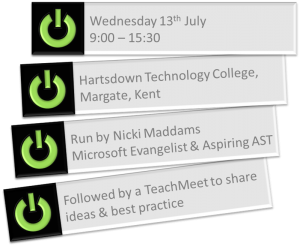
 I am going to be running my successful Kodu in the Klassroom seminar again on 13th July in Margate, Kent. This time it will be free though!
 If you are unfamiliar with Kodu, you can check out my previous entry
 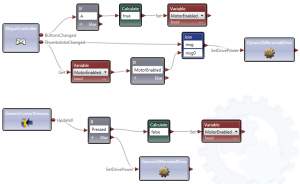 I have recently been playing with
 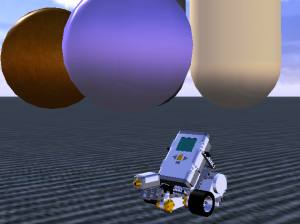 The bonuses don’t end there though, if you want to try out your program without having to connect to your robot you can change to simulation mode which brings up a virtual robot and environment on screen to use for testing, this saves a lot of time when it comes to debugging!
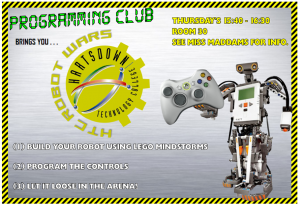 The students will have the opportunity to build their robots and learn how to program and control them in real time using Xbox controllers. The technology faculty have agreed to build an arena, so I just need some keen students and some bluetooth adaptors for the netbooks! I’m very much looking forward to this project, I may even attempt to expand to a local primary school too if it all goes well!
 Yesterday, as part of my Microsoft Evangelist role I was invited to run workshops at