
If you’ve read my blog for a while you will know that I love making games almost as much as I love playing them! I’ve been a huge fan of Scratch since I discovered it as a relatively new teacher, at the time we were using Flowol to teach sequencing and control and the students didn’t find it particularly engaging. Since introducing Scratch I’ve always found game development to be a fantastic medium for teaching coding, as it is so creative and can be open-ended so great for extending students abilities. Games can always be extended, improved or tweaked so are perfect for all abilities and naturally lend themselves to including a range of programming techniques and extension exercises.
A few years later, I discovered Kodu Game Lab. This was quite literally a game changer! I could now introduce my students to 3D games as well! I loved teaching with Kodu so much that I even invited local primary children to my school to create interactive stories, delivered game-development outreach projects in London and Wales and won an award for my scheme of work! Although Kodu is still available, it’s no longer supported and developed by Microsoft which left a large hole for anyone wanting to develop 3D worlds and games with their pupils without the complexity of tools like Unity or Godot! Then . . .
. . . along came Flock XR; my FAVOURITE discovery at the Digital Schoolhouse Playful Computing Conference last year and I’ve been playing with it on and off ever since.
What is Flock XR?
Flock is a free and open-source 3D creation software that runs in the web browser.
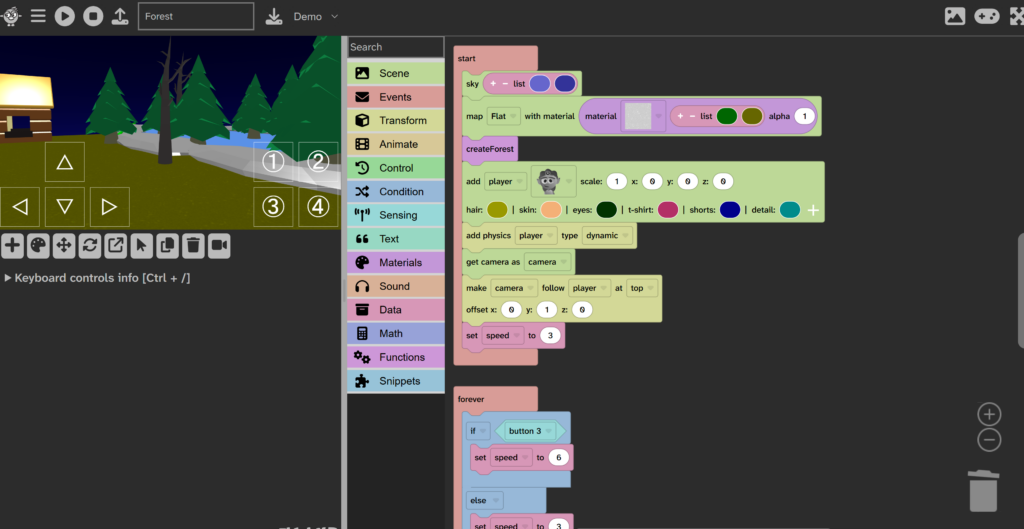
As you can see from the image above, Flock XR is block-based so instantly familiar if you’ve used Scratch or MakeCode, meaning the children (and teachers) are starting with some prior knowledge to build upon.
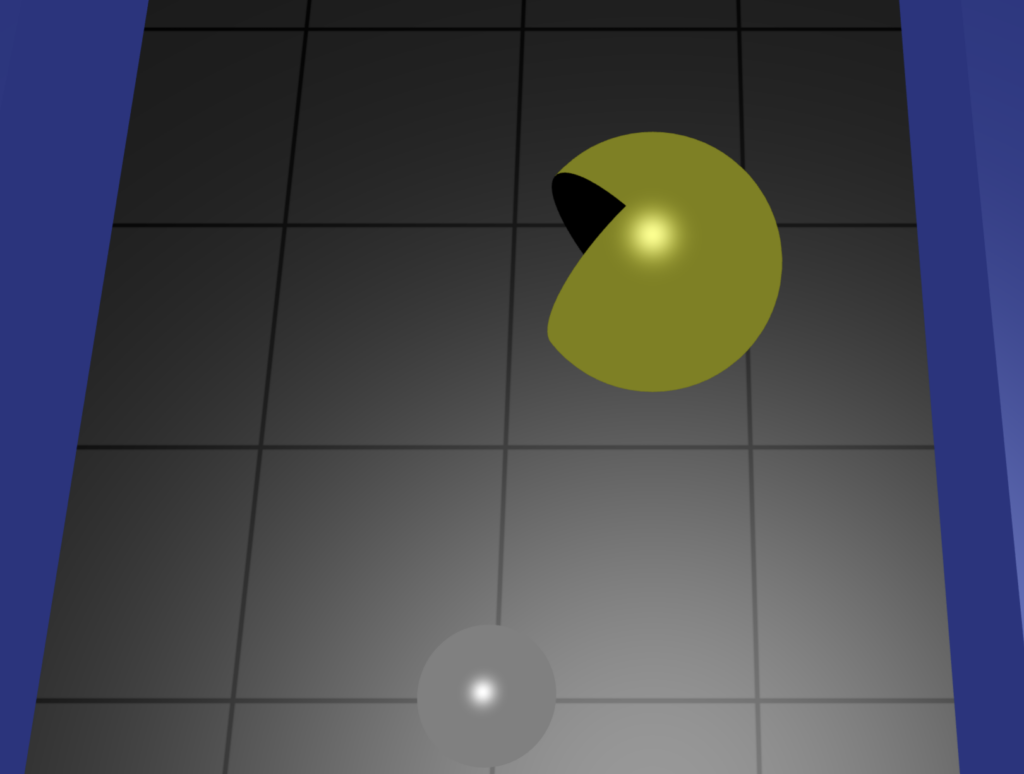
With Flock XR you are able to develop and code 3D shapes and built-in assets. You can even combine 3D shapes together to make your own playable items. Here I’ve made a Pacman character by subtracting a cube from a sphere. You can manipulate their positions in 3D space through code or by using the built-in editing tools. Not only can you code all of the objects’ behaviour and create your own functions, there are built-in reusable code snippets to get you started in the classroom, things like controlling a character, for example. I really like that you can also save blocks of your own code as snippets to use again, I found this particularly useful with setting my camera position, I made a snippet to set a top-down camera view and now I can just import it into any project and just tweak as required.
Things I particularly love about Flock XR:
- Lots of built-in projects to explore (particularly useful if you’re following the PRIMM methodology for teaching programming in class)
- Block based so instantly familiar
- The ability to export code snippets to use again in other projects
- Limited asset library (this could also be viewed as a negative but in my experience too much choice often results in a lot of wasted time in lessons!)
- Being able to toggle/disable blocks of code for testing without having to detach them
- Being able to detach blocks of code by right-clicking (I’d love to see this feature added to MakeCode)
- Code automatically arranged in a line without getting messy
- Compatible with an Xbox game controller (possibly others too)
A few items on my Flock XR wish list:
- I’d love to see shadows under objects (sometimes it feels like the object or character is disconnected from the ground as there is no shadow)
- Velocity for objects (I’d like to be able to set the movement speeds in 3D space for objects, I’ve created a function to achieve this manually in my Asteroids example but it would be easier to set the VX, VY and VZ separately)
- More sound effects (an explosion sound, in particular!)
How to Boost Your Skills
Sometimes it can be tricky to learn new software when you don’t have any ideas of what to create! Personally, I’ve mostly been testing and building my own skills by recreating old arcade games as they don’t require too much imagination on my part and I can get stuck straight into the coding! I was keen to test out the physics in the 3D environment so began with a little Marble Madness remake and have since had fun recreating some basic mechanics from Pong, Pacman, Mario and Asteroids, as well as experimenting with some of the built-in examples and an random obby generator. You can check out some of these examples here:
I’ve found recreating arcade games really useful in the classroom over the years as they provide a good base for learning different game-making skills, in the Pong game, for example, students just see a game of Pong, but, as a computing teacher, this is the learning I see:
- Programming fundamentals of variables, loops, selection and functions
- 3D modelling
- An introduction to AI to create a realistic CPU player
- Maths skills to calculate the ball’s trajectory
I once made a collection of Game Creator Cards which mimicked the old KMP maths cards (am I showing my age now?!), these were used as extension activities for students to work through and students were awarded with stickers as each one was completed. I originally made these for Scratch many years ago but I’m thinking of creating something similar for other platforms too. (Unfortunately I seem to have lost some of the original files!)
If you’re keen to get started with Flock XR and looking for some ideas, check out their new magazine!
If you would like me to visit your school to deliver a game development workshop, you can get in touch through the U Can Too website, where I work as a Computing Curriculum Specialist.
If you’re looking for a practical way to bring block‑based 3D creation into your classroom, Nicki’s recent post on Interactive Classroom.net is a must‑read. She walks through how Flock XR combines the familiar Scratch‑style interface with true 3D game development, offering reusable code snippets, built‑in projects, and even Xbox controller support. Packed with real‑world tips and lesson ideas, the article shows how to boost digital literacy without overwhelming students. Dive into her experience and get fresh inspiration for your next coding unit. Read the full story